See where your
day really goes.
ScreenForge is a native Windows dashboard that tracks app usage, flags interruptions, and keeps every byte on your machine. No account. No cloud. No noise.
Windows 10 / 11 · ~18 MB · No sign-up
 screenforge — demo
Everything you need.
Nothing that phones home.
One native app. Four views. Your data never leaves the machine — inspect the source if you don't believe us.
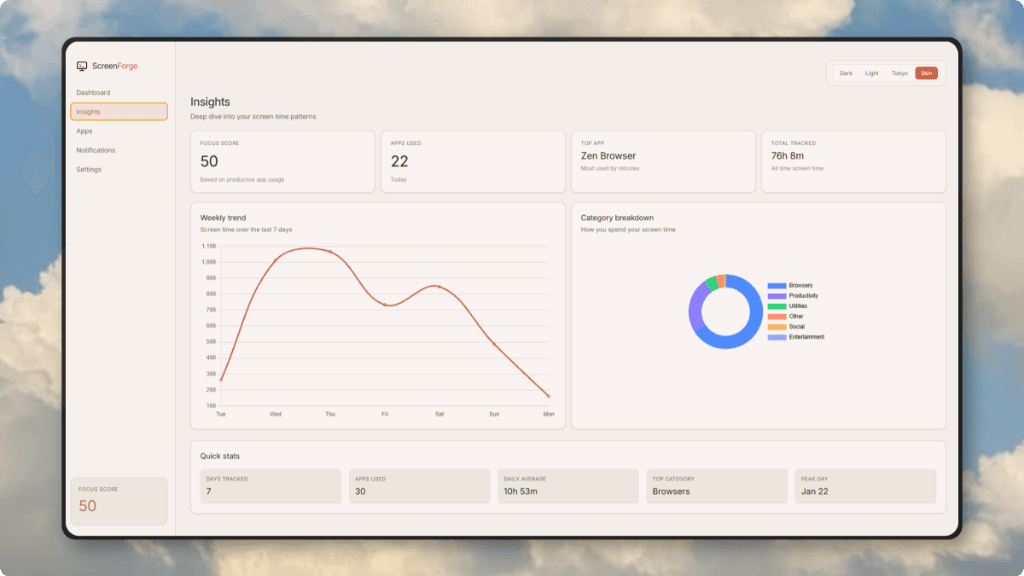
Daily & weekly trends
Screen time plotted honestly. Spot your deep-work windows and your doom-scroll hours.
Local by default
SQLite on disk. No signup, no sync, one-click wipe.
Per-app breakdown
Exactly which executables eat your hours, auto-categorized.
Interruption ledger
Which apps yank your attention, ranked by notification volume.
→ MUTE THE TOP 2, RECLAIM ~1H/DAY
Themes that respect the OS
Dark, Light, Tokyo Night, Skin. Fluent-native, no Electron bloat.
Built like a system utility. Feels like a product.
Four views, zero clutter. Switch tabs — every screenshot below is the real app, running on Windows.
Three steps. No onboarding call.
Install the .exe
One download, ~18 MB. No installer wizard maze, no account wall. Runs on Windows 10 and 11.
Work like normal
ScreenForge samples the foreground window every 5 seconds via native Win32 APIs. Idle and locked time is ignored.
Review on Friday
Open Insights, see the week honestly: top apps, categories, interruption sources. Adjust, repeat.
Trackers that respect you are rare.
Most screen-time tools are subscriptions wrapped around your data. ScreenForge is a local utility: you own the binary, the database, and the delete key.
| ScreenForge | RescueTime | ManicTime | ActivityWatch | |
|---|---|---|---|---|
| Price | Free forever | $9/mo | $99/yr | Free* |
| Open source (MIT) | Yes | No | No | Yes |
| Works fully offline | Yes | No | Partial | Yes |
| No account required | Yes | No | No | Yes |
| Windows native feel | Yes | Web wrapper | Dated UI | Dated UI |